|
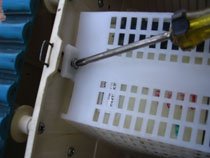
Aquabot Parts Pump ReplacementReplacing Aquabot Parts Pump. This is actually an easy installation IF you don't accidentally separate the pump housing by removing the long screws holding the pump together from the bottom. THE SCREWS HOLDING THE PUMP IN PLACE CANNOT BE SEEN UNTIL THE OUTLET COVER IS REMOVED! TOOLS: Philips and slotted (flat) screwdriver. Small sockets or nutdrivers for the terminal nuts. With the Aquabot upside down and filter bag removed, unscrew two screws holding the white plastic mesh filter screen, then remove the filter screen.
The pump is round and black, sits dead center.
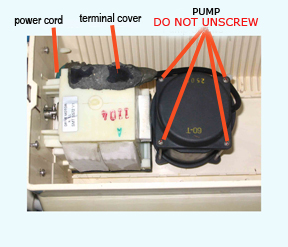
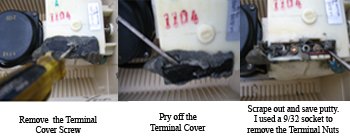
Move to the motor, locate the terminal cover and remove the screw. It may need to be pried out of some putty. With a small flat screwdriver, scrape out the putty until the terminals are visible. SAVE THE ELECTRICAL PUTTY. Unscrew the terminal nut and remove the pump wires.
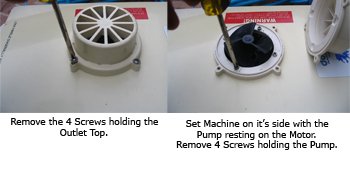
Back to the pump, Remove the outlet covering the impeller on the top of the robot. Under the outlet cover are the four screws that hold the pump in place. remove the pump. DO NOT remove the long screws from the bottom of the pump. They hold the pump casing together If you unscrewed these long screws, there is a good chance oil leaked out. The pump should have about 3/4 cup of either compressor oil or 30 weight NON-detergent oil or mineral oil.
Screw down the new pump. Attach the electrical wires to the motor and repack the terminal well with the electrical putty that you saved. Screw down the terminal cover. Replace the filter screen and the filter bag. If the impeller is broken, pry and pull it off the shaft. It won't come off easy. Push on the replacement impeller. DO NOT test the robot out of water for longer than a few seconds. Best Practice plug in the power cord after the robot is submerged. Test the new pump in the swimming pool or a tub of water. If you need parts, large or small visit Aquaquality Pools and Spas, Inc |