|
Dolphin Troubleshooting for Your Maytronics RobotDolphin Troubleshooting is simple. Don't even bother taking apart the motor compartment. Besides having many many screws, you just can't get replacement parts so save your time. Help has arrived!
Aquaquality Pools and Spas, Inc
is now a dealer and service provider for Dolphin Pool Cleaners and Tiger Shark Pool Cleaners. 1-866-876-8643
Wet Transformer, Wet Power Supply. How to fix it.
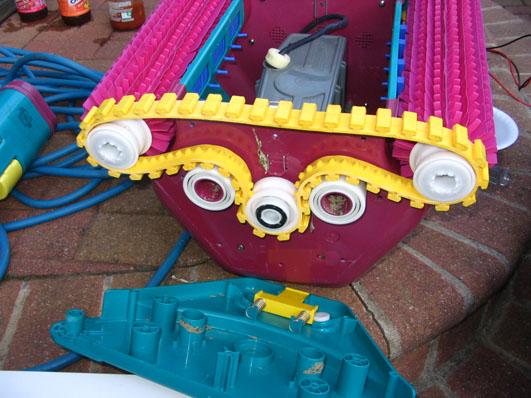
If Your Maytronics Dolphin Stops If your robot stops moving, you MUST shut it down until the problem is corrected. Failure to do so may burn out your drive system. You MUST check for toys or other objects such as acorns that may be stuck in the drive track causing it to stop.
This is the best advice I can give you. Remove every last item from your pool before cleaning with your Dolphin. The smaller the object, the more important it be removed prior to cleaning. These little things can get stuck behind the sideplate and jam the drive system causing irreversible electrical damage. Prevention is key to your robots health because if your robot breaks, you are going to pay with LOTS of down time while the robot is sent for repair. Maytronics Dolphin Diagnostic Power Supply The Dolphin power supply differs greatly from Aquabot. Aquabot transformers only step down the voltage to deliver A/C current to the robot. Dolphin steps down the voltage AND transforms to D/C with an internal circuit board having diodes. I believe this circuit board is one of the few user parts available.
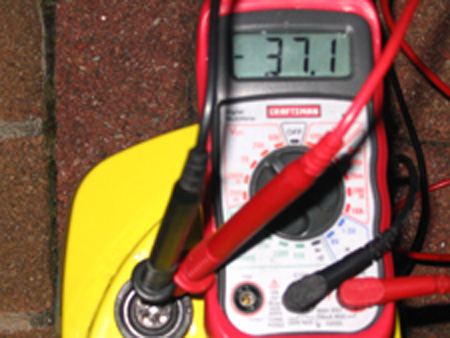
To check your Maytronics Diagnostic power supply, use a multimeter set to 200vdc. Output voltage should be about 38 volts D/C. A known exception, the Robo-Kleen power supply puts out about 30 volts A/C, you read correctly...A/C. Check the label on your transformer for voltage output and type. Maytronic Dolphin Diagnostic Transformer (opens new window)
Post your story or question here.Post your story or question here. What Other Visitors Have SaidClick below to see contributions from other visitors to this page...
Dolphin 4 power supply socket failure
Dx3 s
Nautilus cc plus
Cord gets wrapped into the front of the machine
Dolphin Diagnostic works only when upside down
Dolphin E10 flashing blue
dolphin m4 supreme stays in deep end
Light on but nobody home
My Dolphin has a power source with blinking on/off
Dolphin Nautilus Pool Sweep
Maytronics Dolphin Pro Not Moving
what resistor is CR 38 on Maytronics diagnostic 2010 2310075LF REV1
Newer Dolphin, double wide. Power supply cord at control is over heating.
Replacement Aquabot Power Supply getting very hot
nautilus cc plus is moving very slowly and is struggling to climb the pool walls.
stuck manually cleaning the pool
Cleaner hose rubber detoration
Rubber gasket/seal while reassembling
Robot stop climbing walls Premier from 2014
Maytronic Dolphin DX3 pool cleaner
Weekly Timer Question
Sits and blow air out top
Dophin M400 runs 3-5 minutes then shots off
Dolphin swash model gets stuck on wall
Dophin stopped working is it cold water
Dolphin s300i brush is stuck
Dolphin Nautilus Cleaner goes 2 feet, stops, and comes back to the starting point
Dolphin lost its balance and traction
Dolphin deluxe 4 climbing issue and answer
Help please!! Filter light won’t shut off!
Dolphin Diagnostic - Only one of the two tracks / treads turns
Fan not spinning
Dolphin Triton switch issue
Dolphin falls on its back upside down
Dolphin Magic runs for 30 seconds
Filter indicator turns on too soon
Dolphin M200 Stuck on Side
longer power supply or extension cord?
Push button lights up 2 sec. Then off
Dolphin Interactive - Diagnostic Power Supply - Timer Lights Up, then goes Dark
matronics always says bag dirty
Dolphin 4 - Algae Coming Out the Top
Dolphin Nautilus only cover a small area
Dolphin Premier will not go to top of water line
wall Clima from davey won't turn
Drive motor moved
Dolphin Dynamic Start/Stop Problem
Dolphin Delux 4 Dynamic D. C.
Dolphin DX3 Not Working
Dolphin not receiving power
Dolphin diagnostics 2001 will not move
My Dolphin doesn't pick up dirt or debris
Dolphin moves but doesn't pick up debris/dirt
Dolphin left out of Pool Running
nothing binding
Dolphin DX-3 Starts then Stops after a few feet FIXED IT!
Help Old Dolphin moves 10' back and forth
Maytronics X5 Starts/Stops - Possible reason?
Dolphin Triton won't move
Bag Won't Trap Leaves
Dolphin M5 Pool Cleaner
Ball bearings at Pool Bottom
Sticking on main drains
dolphin blowing fuse after one hour
Resistor identify R38 on Maytronics Basic 2010 2410073LF REV 01
Dolphin Premier won't pick up sand or climb walls
how do I know when it is time to Replace Maytronics Dolphin Nautilus Tracks and brushes
Dolphin Supreme M5 not filtering dirt
Dolphin M4 just stays in the deep end
Dolphin won't suck leaves
How to repair a Maytronics Dolphin robotic pool cleaner that quits early
Maytronics Dolphin Nautilus, Timing Track
Brand new out of box today, Triton Fails
Power Supply
where can I buy the circuitboard?
Advantage Plus Cleaner shuts down too soon
Resistor Identify
power supply all lights are blinking
help needed - goes to same path over and over in deep end
Dolphin Cleaning cycles Automatic Restart
Clean Filters Light is ON, Unit Won't Run.
Dolphin M5 Supreme Liberty Charging Problem
Dolphin Runs for 15 Minutes
Dolphin climbs a wall and stops
Stops after 30 seconds
Dolphin Service
my dolphin continues to flip on its side
R3 Resistor Value Dynamic Pro
Moby Stopped, Need Help
the robot doesn't sink
Dolphin floating cable only has 3 prongs
Dolphin (what we call Flipper)
Dolphin Blowing out debris
Constant 37vdc & won't run
I have 37 vdc, but loses power right away
Dolphin power supply keeps tripping GFI switch
Dolphin Star won't climb walls
Dolphin stops before cycle is finished
Fuse keeps blowing out.
My Dolphin Diagnostic Sank!
Dolphin Pool Cleaner Sucks dont buy one. Company does not Honor Warranty
Dolphin Pool Cleaner won'tRun More than 30 seconds
Dirt Falls From Robot Back Into Pool
Dolphin Tracks will not turn
Dolphin HD starts and runs 2-5 seconds
Dolphin Cleaner not working at all
Odd Dolphin Diagnostic behavior
Dolphin Pool Cleaner won't suck
basic dolphin robotic cleaner - missing the bits
MY DOLPHIN RUNS A FEW SECONDS THEN STOPS
Dolphin Diagnostic Transformer burns fuses
Power Cord Twists
always going forward,,,
power to robot
Dolphin Nautilus CC Plus Stopped Working
Dolphin Escape popping wheelies
Dolphin Drive
My power supply will not come on...HELP
Dophin Junk
Won't reverse
Scheda basic 2010 2410073lf rev 02 Not rated yet
5 star ratings should be NO Star Ratings Not rated yet
Dolphin DL19138B goes forward backwards then shuts off Not rated yet
Nautilus CCPlus tips over Not rated yet
Proteins DX4 runs a foot then stops. Not rated yet
R38 port resistor Not rated yet
Cannot open top door to get the basket out. Not rated yet
Dolphin Deluxe 4 sometimes no drive, sometimes no impeller Not rated yet
Dolphin Nautilus CC Plue Not rated yet
Red light on Not rated yet
tracks spin in opposite direction Not rated yet
Dolphin DX3s shuts off when vertical Not rated yet
Maytronics COP-MOD60 REV06 board burned SMD resistor Not rated yet
Burned SMD precision wire resistor on the COP-MOD60 REV06 circuit board Not rated yet
Burned SMD precision wire resistor in COP-MOD60 REV06 Not rated yet
Dolphin Commander repair now at a stand still. Please help. Not rated yet
Dolphin won't run, says doors are open on filter area Not rated yet
Dolphin C4 loosing track when climbing walls near skimmer. Not rated yet
Dolphin DX3 Does not move when placed in water but will move out of water. Not rated yet
Dolphin m4 Not rated yet
no random pattern Not rated yet
Dolphine supreme M4 pro Not rated yet
My Dolphin DX3 doesn't work like it used to Not rated yet
Power lights on base but cleaner not responding Not rated yet
Dolphin S300i PX flashing light Not rated yet
E10 starts, but then stops Not rated yet
DOPHIN NAUTILUS GETS STUCK ON STEPS CORNER Not rated yet
S100 wont hold sucked up sand anymore Not rated yet
Dolphin Nautilus likes to go up on sides but not the bottom Not rated yet
My dolphin gets stuck in same spot Not rated yet
debris comes out of the back of the cleaner.Dolphin Nautilus CC CleverClean Not rated yet
Dolphin Delux 4 Replacement Power Supply Connector Not rated yet
dolphin pool robot blowing fuses after bearings break Not rated yet
Splayed Hex Adapter Repaired on Deluxe 4 Not rated yet
Nautilus cleans once after being set. Not rated yet
Ddolphin triton plus bought 2016 doors arent shutting tight Not rated yet
Dolphin no longer covers the entire pool surface Not rated yet
Won't power up Not rated yet
problem with mu maytronics diagnostic power supply Not rated yet
Sucking leaves into the fan blade at the top versus into the bag Not rated yet
Dolphin part fell off in the night... Not rated yet
Dolphin wave 100 Not rated yet
dolphin pro rc Not rated yet
Dolphin Supreme M3 runs for 30 seconds then stops Not rated yet
DX5+S - clean filters, but will not reset Not rated yet
Help - need a reliable repair option Not rated yet
Dolphin Diagnostic stops intermittently Not rated yet
diagnostic advantage. Only cleans in deep end Not rated yet
Nautilus - starts moves fwd a foot/back a foot, then stops! Not rated yet
dolphin pro x 2 air sensor Not rated yet
Dolphin M5 suprem Amphenol connector wiring diagram request Not rated yet
Flipper (Dolphin) Scanner Control 2.0 Not rated yet
Dolphin M4 will not run Not rated yet
Power Cord- pivot terminal leak Not rated yet
Not Sure What is Wrong - Dolphin Diagnostic Advantage Not rated yet
Dolphim keeps popping wheelies. Not rated yet
No Power Not rated yet
PC board failed parts available on Ebay for R14,R31, R43 and M3 for the skilled electronics individual. Not rated yet
If your Maytronics moves forward, then back, then stops, read this post for why it happens... Not rated yet
Dolphin Stops after 5 minutes Not rated yet
No Power for the Dolphin Deluxe 4 Not rated yet
Green LED blinking inside motor box. Not rated yet
old dolphin slow go Not rated yet
Love my dolphin Not rated yet
why does my dolphin pool robot float? Not rated yet
Dolphin DX4 Wion't Reach Ends of Pool Not rated yet
Dolphin just climbs the walls Not rated yet
Dolphin robot gets stuck on wall return jets Not rated yet
Dolphin Power Supply Problem Not rated yet
Dolphin Stopped after Motor Replacement Not rated yet
DX4 Clogged Bag Light Not rated yet
moby 2 year old stays in one end Not rated yet
foward for a few second then reverses Not rated yet
dolphin commander Not rated yet
Woke up robot from winter sleep and wouldn't move Not rated yet
Power source turns off Not rated yet
Will Robot cause Holes in Liner? Not rated yet
Moisture iIn Motor Problem Not rated yet
Power pack takes a dive Not rated yet
Dolphin Power Supply Not rated yet
Dolphin Stays in Deep End Not rated yet
Switch problem Not rated yet
Dolphin Erratic Not rated yet
my dolphin model m3 only works for 30 mins and then stops Not rated yet
Dolphin will not power off Not rated yet
Dolphin Advantage On Off On Off Not rated yet
Starts and Runs For Two Minutes Not rated yet
swivel cable will not swivel Not rated yet
Yellow Drive Belt Question Not rated yet
blown fuse on dolphin commander Not rated yet
Wet Power Supply Not rated yet
dolphin pattern Not rated yet
Just moves a few inches and stops. Same thing if I try it again Not rated yet
My new dolphin DX3 does not complete the cleaning cycle Not rated yet
The Dolphin Diagnostic Advantage Power Supply Keeps blowing Fuses Not rated yet
Dolphin Explorer Won't Sink Not rated yet
Maytronics Dolphin Pump Not Working Not rated yet
Just stopped! Power but no power? Not rated yet
Robot Power Supply Got Wet Not rated yet
My dolphin cleaner runs for a few seconds and stops. It moves for a few inches and stops again. Not rated yet
Repair Facility Near NJ Not rated yet
voltage output Not rated yet
Dolphin Deluxe 4 and Drain Covers Not rated yet
Dolphin Diagnostic Advantage Not rated yet
very upset about Dolphin Pro Not rated yet
Dolphin Pool Cleaner Starts up and then stops! Not rated yet
DOLPHIN 4 (BRAND NEW) Not rated yet
the on switch goes on but the cycle button isn't working Not rated yet
Comprehensive Directions the "Manual" doesn't cover? Not rated yet
Dolphin Dynamic will not turn on Not rated yet
it starts goes 5 inches , changes goes back 5 inches and stops..... Not rated yet
Dolphin diagnostic power switch trips when attached to Dolphin unit Not rated yet
dolphin dx 4 not behaving Not rated yet
Dolphin Issues Not rated yet
floating dolphin Not rated yet
Power cable plug pins Not rated yet
Dolphin runs for about 15 minutes then stops. Not rated yet
Not vacuuming Not rated yet
Power Supply Overheats Not rated yet
Blown Fuse Not rated yet
Dolphin Starts and Stops Fix Not rated yet
We have been w/out our Dolphin 4 for a month Not rated yet
Dolphin was found with roller off Not rated yet
Dolphin power supply problem Not rated yet
when i turn the cleaner on, it immediately shuts back off, why is it doing that? Not rated yet
Pool Robot Getting stuck Not rated yet
Dolphin Diagnostic Electric Supply Problem Not rated yet
Dolphin commander power supply Not rated yet
Main drain Not rated yet |